Okay, story time. Remember that time I spent literally all night wrestling with a LaTeX document for my thesis? My advisor wanted a specific page layout, something about "aesthetic harmony" or whatever (he’s an art history guy, go figure). I was pulling my hair out trying to get the darn footer to align just so while simultaneously battling the monstrous beast that is the title page. Ah, memories...mostly painful ones. But hey, I learned a lot that night! And now, I'm here to share that wisdom (or what’s left of it) with you.
So, what are we talking about? LaTeX, of course! More specifically, those tricky little devils: pieds de page (footers), and pages de garde (title pages). They seem simple, but trust me, they can be real headaches if you don't know where to start.
Pieds de Page: Taming the Beast
Let's start with the pied de page. Think of it as the humble servant of your document, quietly displaying page numbers, author names, or maybe even a subtle watermark. But getting it to behave is another story.
Here's the thing: LaTeX has default footers, but they're often... well, bland. And sometimes, you want something totally different. Here's where things get interesting (read: potentially frustrating).
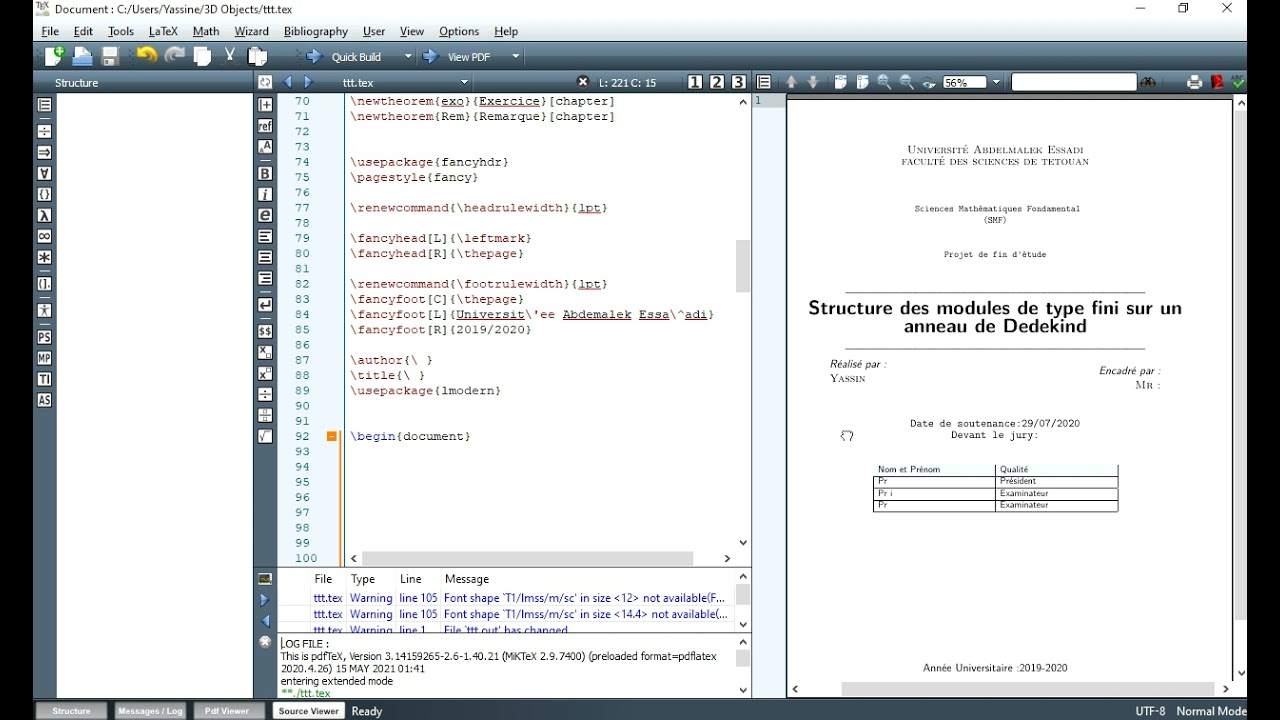
- Basic Customization: The
\fancyheadand\fancyfootcommands are your friends. They let you define what goes into the header and footer regions (left, center, right). - Packages: For more advanced control, look into packages like
fancyhdr. This is the go-to package for fancy headers and footers. It gives you a ton of flexibility! You can define different headers and footers for even and odd pages, for example. Super useful, right? - Don't Forget
\pagestyle: This command determines the overall style of your headers and footers.\pagestyle{fancy}is your buddy if you're usingfancyhdr.\pagestyle{plain}(the default) is... well, plain.
A quick tip: Test your changes frequently! LaTeX errors can be cryptic, so it's best to catch them early. And don’t forget to compile, compile, compile!

Page de Garde: Making a Grand Entrance
Now, onto the page de garde. This is your document's chance to shine! It's the first impression, so you want to make it count. Think of it as the red carpet for your text.
LaTeX offers the \maketitle command, which uses information from \title, \author, and \date. This is a simple, straightforward approach. But... it's also kinda boring. Let’s be honest.
![[Latex ]Exemeple de Page de garde rapport de PFE Latex | Essay cover](https://i.pinimg.com/originals/21/65/0b/21650b51df6956cd078586c44beb8bbc.png)
For a more customized look, you'll likely want to create your own title page environment. Here's a general approach:
- The
titlepageEnvironment: Enclose your title page content within\begin{titlepage}and\end{titlepage}. This tells LaTeX to treat this section differently. - Layout Control: Use commands like
\centering,\vspace, and font size adjustments (\Large,\Huge) to arrange the elements on the page. - Images: Don't be afraid to add a logo or an image! The
graphicxpackage is your friend here. (Remember to\usepackage{graphicx}in your preamble!)
Remember to make it visually appealing and easy to read. Avoid clutter! And for the love of all that is holy, check your spelling. A typo on the title page is a major no-no.
Final thought: Mastering pieds de page and pages de garde takes practice. Don't get discouraged if it doesn't look perfect right away. Experiment, explore different packages, and remember that the internet is your friend. (Stack Overflow is your best friend). Good luck, and may your LaTeXing be ever in your favor!